AI onboarding & adoption
AI onboarding.
A controlled start.
AI onboarding and adoption means introducing artificial intelligence into your existing business workflows. We tell you early if we’re not a fit: AUTOBOTSZ checks systems, available connectors and remote suitability before significant implementation effort. For a suitable setup, we agree scope, test it in a Shadow Business Run, then introduce live access progressively after the required checks and approvals. No routine onboarding call is required.
For UK SMEs and organisations, including Manchester and our Bolton home market in Greater Manchester, the approach is remote: agree a useful workflow and check the fit before setup. Our regional base does not limit national scope. Contact AUTOBOTSZ about remote onboarding.
Simple when simple. Deeper assurance when complex. We keep standard onboarding proportionate: compatibility checking and a Shadow Business Run for everyone, with an extended, separately scoped run where complexity warrants it.
On this page, explore the synthetic workflow below to see prepared work, evidence and a simulated decision. For your own service, the remote journey must separately establish compatibility, agreed scope and terms, authorised access, a Shadow Business Run and activation checks. This illustration does not connect your systems or complete onboarding.
What setup delivers
A workflow your team can understand.
Agree what will run, which systems it may use and who handles exceptions. The scope includes the operating rules, testing and evidence needed to judge the result — not an open-ended transformation programme.
Governance before tools
Define what the workflow may do, what it must never do, who can approve consequential actions and when a person takes over.
AI implementation in existing workflows
Fit AI-assisted steps into the systems and processes the business already uses instead of creating an isolated chat experience.
Security and access
Connect only the information and systems required for the agreed purpose, with each business's data kept separate, access tied to responsibilities and permissions that can be withdrawn.
AI adoption by people
Give employees clear responsibilities, usable guidance and a route for exceptions. Explain client-facing changes plainly and preserve human support.
Testing and approvals
Observe and test the workflow before consequential live use. Keep sensitive actions behind the agreed approval and confirmation controls.
Evidence and improvement
Record what happened, verify outcomes and use real operational evidence to decide what should improve next.
We test before we connect.
Every suitable workflow is rehearsed safely before live operational access is introduced.
A practical sequence
From business need to governed operation.
- 01
Automation Assessment
Describe the work, the outcome you want and the systems you use. We identify where automation can help.
- 02
Systems Compatibility
Check connections, permissions and remote suitability. Setups needing onsite engineering are declined here.
- 03
Shadow Business Run
Rehearse workflows, approvals, notifications and failure paths with synthetic/mock data, then review and resolve gaps.
- 04
Live Onboarding
Start read-only where possible. Activate live writes only after the required checks and approvals.
Qualification checks your existing software, available APIs or connectors, security constraints and whether onboarding can be completed remotely. Systems requiring specialist onsite technical implementation are declined at qualification.
Testing checks outputs and failure paths before consequential live use. Address gaps before progression; expand only when recorded results support it.
Business · Command Centre
See the same workflow move across desktop and mobile.
One workforce. One set of permissions. Web and mobile. Follow a prepared request, inspect its evidence and see where a person must decide. This is a synthetic rehearsal of that shared experience, not an end-to-end live customer deployment.
See how work moves
From signal to authorised decision.
Not just a view of the work. A clear thread from the first request to the recorded outcome, with human control where it matters.
uuko · Service assistant
One request. The right context.
An operations manager asks uuko to prepare an update about a delayed order. uuko captures the request and passes the context on; it does not approve the reply.
Context captured
“Order EX-104 is delayed. Prepare an update for the customer, but let me review it first.”
Request linked to the example order
Coordinated by Autobots. Guided by uuko. Consequential decisions stay with authorised people.
What would count as a useful result?
Agree the measure before starting. These are definitions, not figures or a promise that each measure is currently available. Demonstrations use fictional records; client reporting must use permitted recorded evidence. Missing data is unavailable or not measured, never silently zero.
- Calls answered
- Distinct calls with a recorded answer event in the agreed reporting period. Offered, missed or failed calls are counted separately; answering is not proof an enquiry was resolved.
- Enquiries captured
- Distinct usable enquiry records containing the agreed required details. Duplicate, incomplete and test records are reported separately; an enquiry is not a sale.
- Response time
- Elapsed time from recorded receipt to the agreed first response. State the period, channels, sample size and whether the response was automated or from a person; missing timestamps mean not measured.
- Approvals
- Pending requests and recorded approve/decline decisions are separate counts. A decision records an authorised person's choice, not proof that a later external action succeeded.
- Workflow exceptions
- Recorded items that need review because information, permissions or an expected result are missing. Show open and resolved items separately, with their scope and reporting period.
- Staff time saved
- Compare staff effort for equivalent work before and after, including review, corrections and support. Use an agreed baseline and measurement window; without comparable evidence, time saved is not measured.
Watch the synthetic web + mobile film
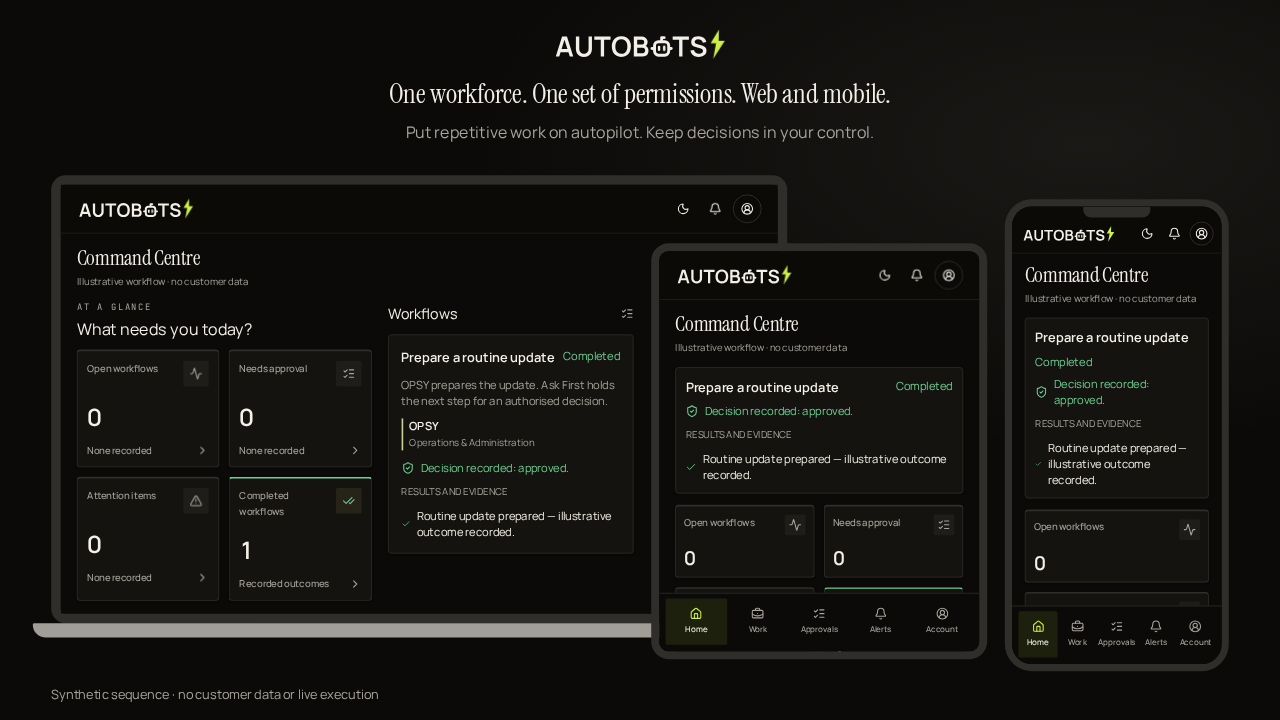
Use the Command Centre for depth. Use the app for approvals, alerts and control on the move.
What stays with you
Clear ownership from the start.
Know who can approve important actions, who handles exceptions and how access can be withdrawn. Your team keeps business judgement; the Automation Workforce handles permitted steps.
A Customer Constitution sets the boundary.
- Purpose and approved business context
- Systems and information the workflow may use
- May Do, Ask First, Never Do and Escalate rules
- Named approval and human-escalation responsibilities
- Verification, audit evidence and review conditions
Questions businesses ask
Business AI onboarding FAQ.
Will AUTOBOTSZ test on my live systems?
The Shadow Business Run uses synthetic/mock data or other permitted test data, not your live operations. After it and the required checks, we connect progressively — read-only first where possible. Any later live testing or write activation needs the agreed permissions and approvals.
What is a Shadow Business Run?
A pre-onboarding readiness step. AUTOBOTSZ builds a controlled, non-production representation of your systems, workflows, permissions and approval routes, then rehearses the proposed automation to find compatibility issues and likely snags. It is a representative model, not an exact replica or a copy of your data.
What happens if the Shadow Business Run finds a problem?
We pause progression before live writes, review the gaps and resolve them where possible. You receive a simple readiness outcome: ready, ready with actions, or not suitable for standard remote onboarding. Systems requiring specialist onsite technical implementation are declined.
Will signing up interrupt my current systems?
The process is designed to minimise disruption by validating the setup before live onboarding. If we find a compatibility issue, we pause and resolve it before live writes. Incompatible environments are not forced through; systems requiring specialist onsite technical implementation are declined at qualification.
Is the Shadow Business Run charged separately?
Every AUTOBOTSZ setup is shadow-run before live activation. For standard packages and the AI Receptionist, this is included in onboarding. For complex or bespoke deployments, an extended Shadow Business Run may be separately scoped and priced as part of the implementation scope.
What is AI onboarding for businesses?
AI onboarding for businesses is the structured process of introducing artificial intelligence (AI) into the business’s existing workflows, not employee onboarding. It covers suitable workflow selection, approved information access, responsibilities, security controls, employee and client adoption, testing, approvals, monitoring and ongoing improvement.
How does AUTOBOTSZ help a business onboard AI safely?
AUTOBOTSZ starts with compatibility checks, agrees the workflow boundaries, rehearses with synthetic/mock data, then connects progressively — read-only first where possible, with required approvals before live writes.
Does business AI onboarding mean automating every decision?
No. A business can keep work advisory, allow approved routine steps to run, or permit bounded autonomy for a specific workflow. Important decisions can remain with authorised people.
How are employees and clients included?
The onboarding plan should explain what changes, what remains a human responsibility, how exceptions are handled and where support is available. Client-facing changes should use clear language and preserve an appropriate route to a person.
Start with one suitable workflow.
Complete the Automation Assessment. AUTOBOTSZ reviews your answers, checks compatibility with your existing systems and identifies where automation can deliver practical value. You'll then receive a tailored recommendation and next steps. If anything requires clarification or human attention, we'll let you know.
Automation Assessment